
Diffblue Cover is an AI tool that reads a Java codebase and writes JUnit tests against it. It runs as an IntelliJ IDEA plugin, and the pitch is straightforward: point it at a class, and a few seconds later there are tests underneath it in src/test/java.
This guide covers what it costs, how to install it, the requirements that will stop it running, what the generated tests actually look like, and the limits we've hit using it on real Java services. We've kept the limitations section long on purpose, because knowing where the tool stops is what decides whether it's worth introducing to a team.
What Diffblue Cover costs
Cover is sold in tiers. There's a free Community Edition, and paid Teams and Enterprise editions for organisations. The Community Edition is genuinely free and issues a perpetual licence, though you have to complete a product verification step to activate it. Diffblue publishes the current feature limits on their own pricing page, and those move, so check there rather than trusting a number in a blog post.
One licensing detail matters more than the price and rarely gets mentioned up front: the plugin performs a remote licence check with Diffblue's licensing server each time it's used. If your developers work in an air-gapped environment, or on a network where outbound traffic to third-party services is restricted, that's a blocker rather than an inconvenience. Offline activation exists, but only on the Enterprise edition and only through the CLI. Find this out before you plan a rollout, not during it.
Installing the Diffblue Cover plugin
There are two ways in. The Marketplace route is the one most people want.
From the IntelliJ Marketplace
Open the plugins panel, which is under File > Settings > Plugins on Windows and Linux, or IntelliJ IDEA > Preferences > Plugins on macOS. Search for "Diffblue" in the Marketplace tab and install it, then restart the IDE.
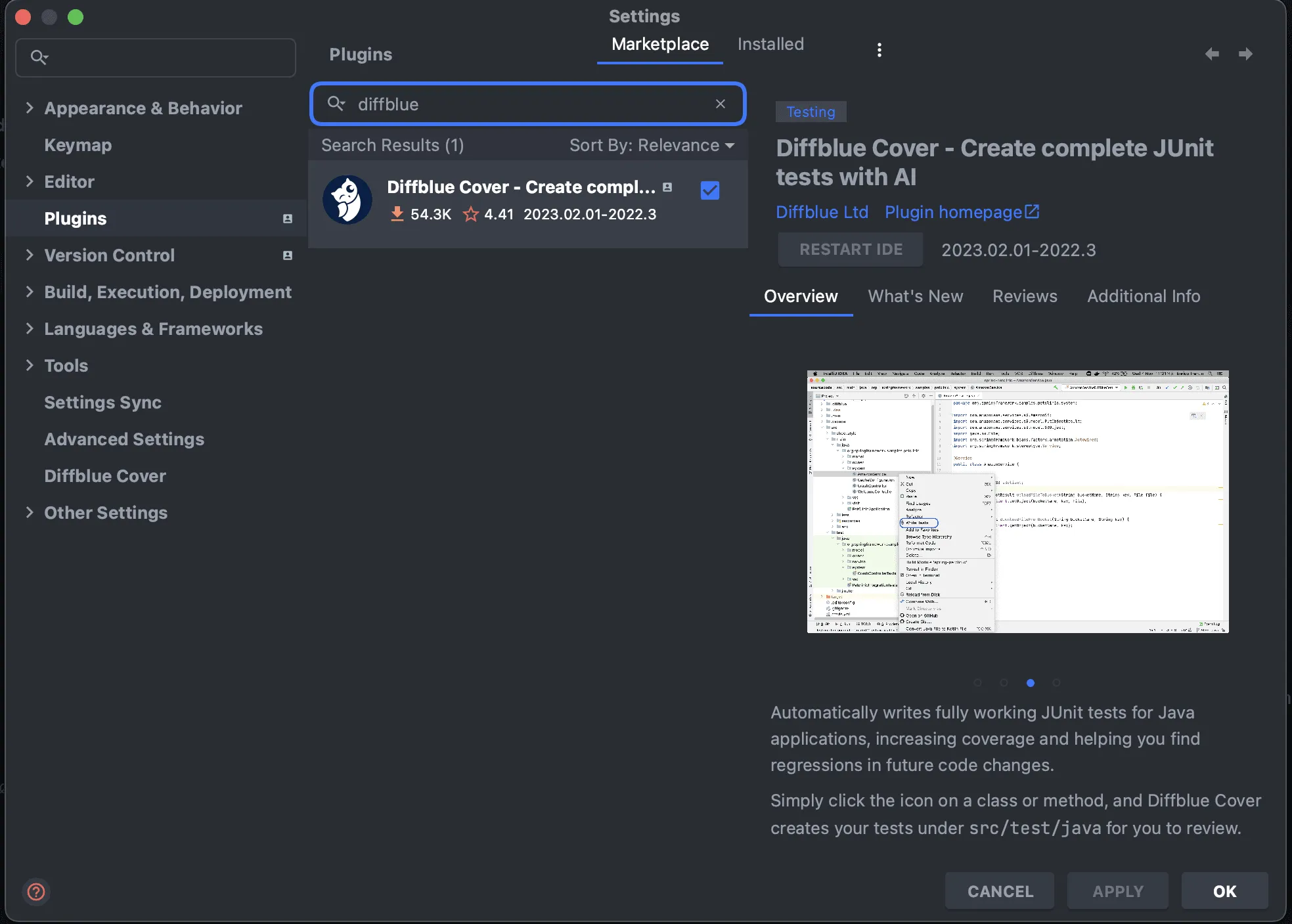
After the restart, Cover adds its own entry in the settings tree, so you can confirm the install took by looking for "Diffblue Cover" in the left-hand settings list.
From a ZIP archive
If your organisation distributes plugins internally, or you need a specific version, download the archive from the Diffblue website, the JetBrains Marketplace, or your internal store, then use Plugins > Install Plugin from Disk and select the file.
Either way you'll need to activate a licence, using the details in your welcome email or from whoever administers Cover in your organisation.
Requirements that will actually stop it running
Cover is stricter about its environment than most IDE plugins, and a mismatch here is the single most common reason it refuses to generate anything. These are the current supported versions.
Java
Cover supports Java 8, 11, 17, 21, and 25, but the patch level matters: Java 8 from 8u351, Java 11 from 11.0.17, and Java 17 from 17.0.5. Only 64-bit JDKs are supported. Java 11.0.7 is specifically not supported, which is a genuinely nasty trap if that happens to be the version pinned in your build, because the failure doesn't announce itself as a version problem.
Kotlin is supported too, and Cover writes the tests for Kotlin code in Java.
IDE, build tools, and test frameworks
- IntelliJ IDEA 2025.3 or later, Community or Ultimate.
- Build tools: Maven 3.2.5+, Gradle 4.9+, or Ant 1.10.4+. Your Gradle version has to be one that works with your Java version, which is its own small compatibility puzzle.
- Test frameworks: JUnit 4.11 to 4.13, JUnit 5.0 to 5.12.2, or TestNG 6.0.1 to 7.10.2. The dependency has to already be declared in your
pom.xmlorbuild.gradle.
Your project also has to compile and have no failing unit tests before Cover will work on it. This sounds obvious and catches people constantly, because the legacy codebase most in need of generated tests is often the one with three tests that have been failing since 2021.
Does Diffblue Cover support Android?
No. Android projects are not supported, and this is stated plainly in Diffblue's own requirements documentation rather than being an undocumented gap.
This catches teams out because Android is Java and Kotlin, both of which Cover handles in other contexts, so the assumption that an Android module will work is reasonable and wrong. If you're looking for generated unit tests on an Android codebase, Cover is not the tool, and no amount of configuration changes that. Plain JVM modules inside a wider Android repository are a different question, but the Android application modules themselves are out of scope.
Writing your first tests
Cover works through gutter icons in the editor. Two are worth learning immediately.
 Write tests. Click this next to a class or a method and Cover starts generating. Clicking it at class level writes tests for everything it can reach in that class.
 Private method. This method can't be tested directly because it's private. It may still be covered indirectly through a public method that calls it. If you want it tested on its own, widen it to public or package-private.
Diffblue's own getting-started walkthrough runs against the Spring PetClinic sample project, which is a sensible way to see the tool work before you point it at anything of your own. Their example generates seven tests for a class in about 65 seconds, which is a fair indication of the speed on straightforward code.
What a generated test actually looks like
The examples below are illustrative rather than captured from a run, written against a deliberately plain service so the shape is clear. Suppose you have this:
@Service
public class InvoiceService {

    private final InvoiceRepository repository;

    public InvoiceService(InvoiceRepository repository) {
        this.repository = repository;
    }

    public BigDecimal totalForCustomer(Long customerId) {
        List<Invoice> invoices = repository.findByCustomerId(customerId);
        return invoices.stream()
                .map(Invoice::getAmount)
                .reduce(BigDecimal.ZERO, BigDecimal::add);
    }
}
Cover will mock the repository, feed it something it can construct, call the method, and assert on whatever comes back. The result has a recognisable shape:
@Test
void testTotalForCustomer() {
    InvoiceRepository repository = mock(InvoiceRepository.class);
    when(repository.findByCustomerId(Mockito.<Long>any()))
            .thenReturn(new ArrayList<>());

    InvoiceService invoiceService = new InvoiceService(repository);
    BigDecimal actual = invoiceService.totalForCustomer(1L);

    verify(repository).findByCustomerId(eq(1L));
    assertEquals(new BigDecimal("0"), actual);
}
That test is correct, and it is also worth very little. It proves the method returns zero for an empty list, which was never in doubt. This is the pattern to watch for: a generated test describes what the code currently does, and that only matches what the code should do if the code is already right. Run Cover across a class with a bug in it and you get a test that carefully pins the bug in place.
The useful output tends to be the tests around the awkward branches, where Cover has found an input combination a person wouldn't have bothered to write out. Those are worth keeping. The trivial ones are worth deleting, and deleting them is part of the job rather than a sign something went wrong.
You'll also see runs that produce nothing. Cover reports what it couldn't do and why, with reason codes such as "no inputs found that don't throw a trivial exception", and will sometimes write partial tests as a starting point instead. Those messages are the most useful diagnostic the tool gives you, because they usually point at a constructor or dependency that's hard to build in isolation, which is a testability problem in the code rather than a failure of the tool.
Using Diffblue Cover with Eclipse
Worth being clear about this, because it's widely misreported, including in an earlier version of this post: there is no Diffblue Cover plugin for Eclipse. The IDE plugin is IntelliJ IDEA only.
Eclipse users aren't shut out, but the route is different. Diffblue's CLI, Cover CLI, can be configured as an external tool inside Eclipse and driven from there. It's a working setup, not an equivalent experience: you get command output rather than gutter icons, and the tight in-editor loop that makes the IntelliJ plugin pleasant isn't there. If Eclipse is your standard IDE, factor that in before promising a team a one-click workflow.
Where Diffblue Cover stops
This is the part worth reading twice. None of it makes the tool a bad choice, but all of it changes how you'd plan work around it.
- It only covers paths it can execute. Cover generates from code paths it can observe during analysis. Anything it can't reach never gets covered, which means a coverage percentage can climb while the genuinely risky branch stays untested. Coverage after a generation run is a less honest number than coverage after a human wrote the tests.
- gRPC support is thin. Testing at gRPC controller level, we found it couldn't test
StreamObserverusingStreamRecorder. If your service surface is mostly gRPC, expect a much lower yield than the marketing implies. - The environment requirements are rigid. The Java version matrix above isn't advisory. Getting a legacy project onto a supported JDK purely to run the generator can be a real piece of work, and that cost belongs in the estimate.
- Test quality tracks code quality. Straightforward code with clean dependencies produces good tests. A class with heavy static coupling, hidden state, or an expensive constructor produces little, or produces something that needs rewriting by hand.
- It generates functional tests only. Nothing here addresses performance, load, or security. Those need their own approach.
- It is not infallible. Like any automated tool it can produce tests that fail against correct code, and tests that pass against incorrect code. A generated suite nobody has read is coverage on paper and nothing else.
How we use it on client work
The situation where Cover clearly pays is narrow and real: a legacy Java service sitting near zero coverage, where the goal is a safety net before a refactor, and hand-writing several hundred tests is a quarter of work nobody is going to fund. Generating a baseline in an afternoon genuinely changes what's possible.
Our rule is that generated tests arrive as a pull request, never as a merge. An engineer reads what the tool wrote, keeps the assertions that describe intended behaviour, and deletes the ones that only describe current behaviour. That review is not overhead, it's the step that turns generated output into a suite anyone can trust. Skip it and you've bought a coverage number rather than a safety net.
If you're weighing this up for a Java codebase, our quality engineering and test automation team does this work as part of wider test strategy, including the unglamorous testability fixes that decide whether generation is worth attempting at all.
Frequently asked questions
Is Diffblue Cover free?
There's a free Community Edition with a perpetual licence, activated after a product verification step, alongside paid Teams and Enterprise editions. Current feature limits are on Diffblue's pricing page.
Which IDEs does Diffblue Cover support?
IntelliJ IDEA 2025.3 or later, Community or Ultimate. There is no Eclipse plugin, though Cover CLI can be run as an external tool from within Eclipse.
Which Java versions does Diffblue Cover support?
Java 8 (8u351+), 11 (11.0.17+), 17 (17.0.5+), 21 (21.0.1+), and 25, on 64-bit JDKs only. Java 11.0.7 is explicitly not supported.
Does Diffblue Cover work with Android?
No. Android projects are not supported.
Does Diffblue Cover work with Kotlin?
Yes. Kotlin is supported, and the tests Cover writes for Kotlin code are written in Java.
Does Diffblue Cover need an internet connection?
Yes, for normal use. The plugin performs a remote licence check with Diffblue's licensing server each time it runs. Offline activation is available only on the Enterprise edition, through the CLI.
Why did Diffblue Cover write no tests for my class?
Usually because it couldn't construct the inputs. Cover reports a reason, often that it found no inputs that don't throw a trivial exception. That normally points at a constructor or dependency that's difficult to build in isolation, so the fix is in the code's testability rather than in the tool's settings. An unsupported Java version or a project that doesn't currently compile will also produce nothing.
Should generated tests be committed as-is?
No. Review them first. A generated test encodes current behaviour, so if the code under test is wrong, the test will faithfully preserve the bug.