About Prism NFT
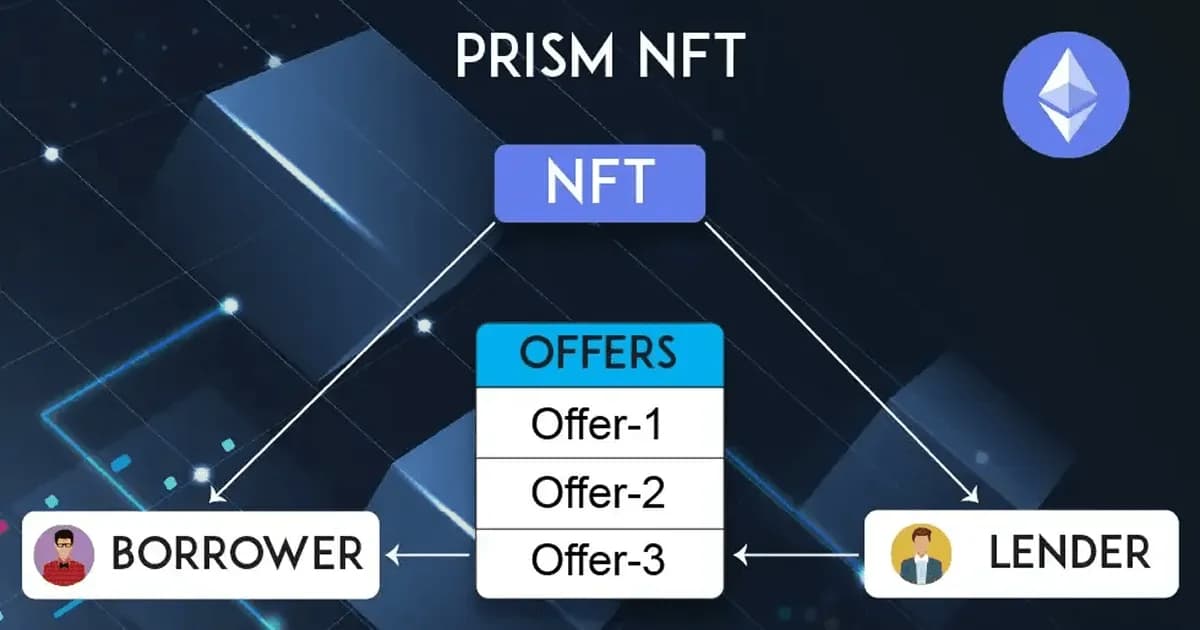
Prism NFT is a blockchain platform that allows users to use their NFTs as collateral for loans. Users can create loan requests, receive offers from lenders, and once the loan is repaid, reclaim their NFTs.
Key Features of Prism NFT:
- User Profiles: Lenders and borrowers typically create profiles on the platform, specifying their preferences, risk tolerance, and lending or borrowing history.
- Loan Listings: Borrowers list their loan requests, including the amount they need, the collateral they offer (NFTs, in this case), and the interest rates they are willing to pay.
- Lender Offers: Lenders review these loan listings and make offers to borrowers based on their lending criteria, including the collateral's value, loan-to-value ratio, and borrower's creditworthiness.
- Matching Algorithm: An algorithm on the platform matches lenders' offers with suitable loan listings, considering factors like loan amount, interest rates, and collateral.
- Smart Contracts: Smart contracts handle the terms of the loan, including collateral management and repayment schedules.
- No Repayment: In case of no repayment by the borrower after an active loan package has been created, a Settlement Action will be created, and the lender will receive the NFT asset.
- Repayment: In case of repayment by the borrower after an active loan package tenure has been completed, a settlement action will be created, and the borrower will get back the NFT asset.
Our Approach:
Our approach comprises four key steps
1. Discover the Solution
In this phase, we focus on understanding the problem deeply, conducting market research, and identifying the best ways to address the NFT lending challenge.
2. Design the Product:
Following our discovery phase, we enter the design stage. Here, we sketch out the user experience, create wireframes, and plan the technical architecture required to build Prism NFT.
3. Develop:
Once our design is solid, we roll up our sleeves and get to work. This is the implementation phase where we bring the platform to life, developing the smart contracts, user interfaces, and backend systems.
4. Deploy and Test:
After development, we deploy Prism NFT, making it accessible to users. Our work doesn't stop there; we continuously iterate, incorporating user feedback and improving the platform to ensure it remains effective and user-friendly.
Smart Contracts
Research :
In the research phase, we tackled the challenges of developing smart contracts in Web3, especially considering their immutability once deployed on the mainnet. Extensive market analysis guided us in carefully identifying and addressing all project requirements. To bring our smart contracts to life, we leveraged OpenZeppelin, a reliable library known for creating secure and upgradable contracts. For testing and deployment, we employed Hardhat, a robust framework commonly used in Web3 development. Hardhat offers excellent support for Solidity and a wide array of useful features, making the development process smoother and more efficient.
Smart Contract Flow :
Users can make NFTs (non-fungible tokens) using an NFT contract. If they want to use these NFTs as collateral for a loan, they must first put them up for sale on a marketplace, asking for a certain amount of Ethereum. The marketplace contract ensures that the NFT can be sold and gets the user's permission for the transfer.
Once the NFT is listed on the marketplace, a user can create a loan with specific terms like how much they can borrow in comparison to the NFT's value (this is called the LTV ratio) and how long the loan lasts. This is where the lending contract comes in. Whenever a loan is being created it creates a promissory note using a promissory contract in exchange as collateral when funds are received from the lender and also locks the loans and NFT that are being used with that promissory note.
Now, another user who wants to lend money can make offers on the loan. The borrower can accept an offer from a lender who meets their requirements. When they do, the lending contract will upgrade the loan status to ACCEPTED.
After the lender transfers the agreed-upon amount, the lending contract will transfer ownership of the NFT from the borrower to the lender and also transfer the promissory note from the borrower to the lender. If the borrower repays the loan, the NFT ownership goes back to them, and the promissory note will be transferred to the borrower and burn the promissory note releasing all the loans and NFTs associated with the promissory note.
Frontend
We have developed the frontend utilizing Next.js version 13, incorporating Wagmi configuration to handle blockchain queries and facilitate connection to the MetaMask wallet. In addition to this, we have integrated Redux configuration to efficiently manage APIs, enhancing the overall functionality of the system.
Custom Wagmi Configuration:
Find the wagmiConfig.ts file and make the necessary changes to connect to different wallets and blockchain networks such as localhost, testnet, mainnet etc …
Step 1: Import Dependencies
Start by importing the required dependencies from the "wagmi" library and other relevant modules.
	import { createConfig, configureChains, mainnet } from "wagmi";
	// import the custom providers for infura,alchemy,quichnode
	import { infuraProvider } from "wagmi/providers/infura";
	// import the custom chains for mainnet and testnet*
	import { localhost, sepolia } from "wagmi/chains";
Step 2: Configure Blockchain Networks
Use the configureChains function to define the blockchain networks you want to connect to. In this example, we have configured the "mainnet" and "sepolia" networks for production and testnet, respectively. Make sure to provide the necessary API keys or URLs for your chosen providers.
	const { chains, publicClient, webSocketPublicClient } = configureChains(
  	   [mainnet, sepolia], // Add other networks if needed
  	   [infuraProvider({apiKey: process.env.NEXT_PUBLIC_INFURA_PROJECT_ID as string,}),
    		// Add more providers, e.g., for localhost, as required
  	   ]
	);
Note: Before going forward for read, write contracts make sure you have contracts deployed in any network with above-configured networks and the deployed contractsData folder is available in your frontend working directory
Read Contracts:
Step 1: Create a contract instance
You can create a contract instance with contract abi and contract address
	   // import the contract abi and address for a contract
	   // import required dependencies
	   import {getContract} from "wagmi/actions";

	   // create a new instance of an contract
	   const contractInstance = getContract({
    	     address: contractAddress // import from ContractData ,
    	     abi: contract.abi // import from contractData,
	   });
Step 2: Call read
Now you can call the methods available in abi with above created instance
	    const response = await contractInstance.read.methodName([
	   	// optional parameters
	    ]);
Write Contracts:
Step 1: Import required dependencies
	// import the contract abi and address for a contract
	// import required dependencies
	import { prepareWriteContract, writeContract } from '@wagmi/core'
Step 2: Use prepareWriteContract
Use prepareWriteContract from the core components of wagmi.
	    const { request } = await prepareWriteContract({
  	       address: contractAddress,
  	       abi: contractAbi,
  	       functionName: methodName,
  	       Args:[] // pass arguments as an array
	    })
Step 3: Use writeContract
Use writeContract from wagmi core components to call above query.
const { hash } = await writeContract(request)Error handling:
Error handling when working with wagmi can be done with the use of interfaces provided by the core component of wagmi
   	// import required error types from viem
   	import {ContractFunctionExecutionErrorType, TransactionExecutionErrorType} from "viem";

   	try {
     	   // block of code
   	} catch(error) {
     	   let error: any;
     	   switch (err.name) {
       	     // add more conditions based on type of error
       	     case "ContractFunctionExecutionError":
         	 error = err as ContractFunctionExecutionErrorType;
         	 break;
       	     case "TransactionExecutionError":
         	 error = err as TransactionExecutionErrorType;
         	 break;
       	     default:
         	 reject(err.name);
         	 return;
     	   }
     	   if (error?.details) {
       	     reject(error.details.split(":")[1]);
     	   } else {
       	     reject(err.name);
     	   }
   	}